
14. API & 연동
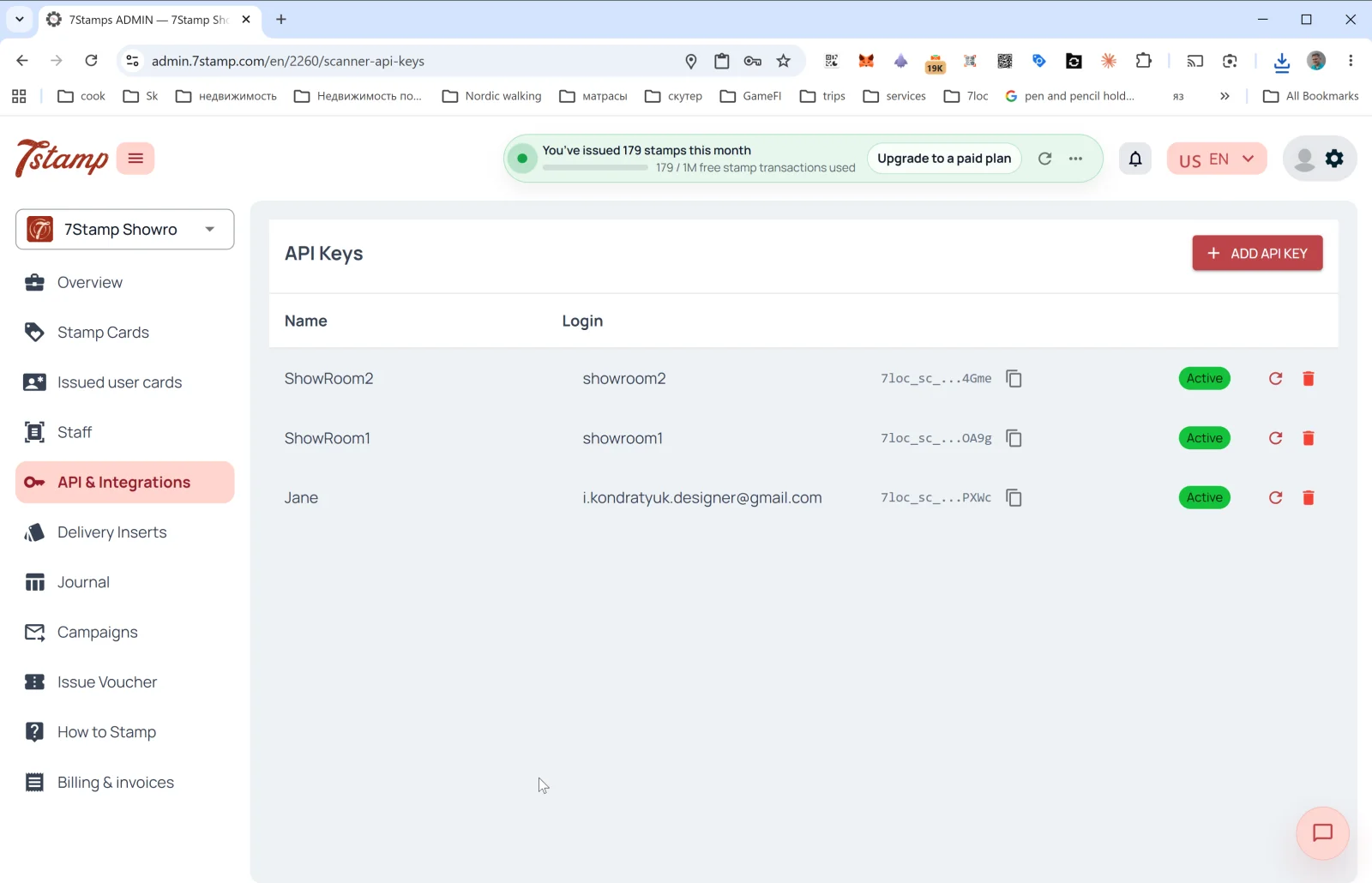
The API & 연동 섹션 contains tools for programmatic integration of 7stamp with your external systems — CRM, POS, ERP, analytics, messenger bots.
API Keys
The main page of the 섹션 is the API key list. Columns:
- Name — key name (usually matches the linked 직원 name).
- Login — the 직원 login the key is tied to.
- API Key — the key itself (starts with
7loc_sc_..., hidden by default, copyable with one click). - Status —
Active. - 🔄 — regenerate the key.
- 🗑️ — delete the key.
Creating an API key
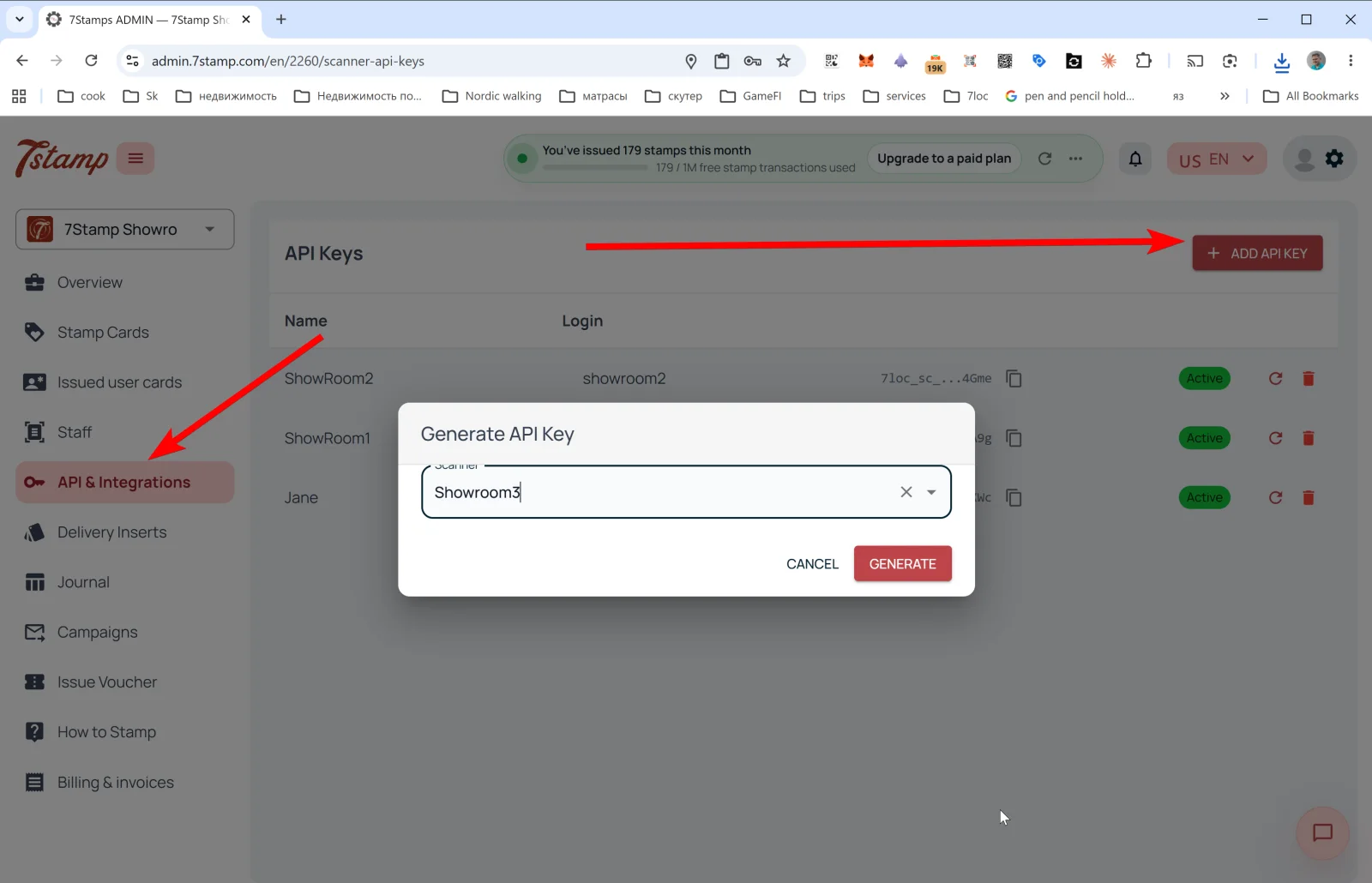
Tap + ADD API KEY — the Generate API Key popup opens:
- 직원 스캔ner — dropdown to pick the 직원 Login the key will be bound to (one 직원 can have one key).
- Buttons CANCEL / GENERATE.
After GENERATE the key is created and appears in the list. Copy it immediately — the full key may not be shown again.
What you can do via the API
- Issue a 카드 to a 고객 by email/phone.
- Add a 스탬프 to a specific 고객.
- Issue a voucher (templated or custom, with Redeem Code).
- Redeem a voucher (if you work via your own POS).
- 읽기 state of the 카드, progress, history.
- Subscribe to Webhooks to receive events in real time.
Webhooks
Webhooks send 카드 events to an external system. 지원ed (see the event glossary):
카드_issued,카드_saved,카드_opened.스탬프_added.goal_reached,보상_issued.voucher_issued,voucher_redeemed,voucher_expired.lottery_played(with the result).birthday_reached.inactivity_trigger.캠페인_sent.
Webhook payload example
{
 "event": "voucher_redeemed",
 "timestamp": "2026-05-11T12:34:56Z",
 "비즈니스_id": "b_123",
 "location_id": "loc_45",
 "고객": {
 "id": "c_789",
 "지갑_pass_id": "wp_abc",
 "language": "en"
 },
 "카드": { "id": "카드_001", "goal_index": 2 },
 "voucher": {
 "id": "v_555",
 "type": "voucher",
 "redeem_code": "FREECOFFEE",
 "redeem_code_formats": ["text", "qr", "barcode"],
 "status": "redeemed",
 "redeemed_via": "직원_scanner"
 }
}
Ready-made POS integrations
- Poster — ready-made integration, connects in a few clicks.
- Serve — ready-made integration.
- Other tills — made on request. Free if technically feasible (i.e., your till exposes an 열기 API or Webhooks).
Messenger broadcasts via 7loc.com
For WhatsApp, Telegram, Viber broadcasts, the 7loc.com integration is connected. Once active, the “messengers” channel becomes available in 캠페인 다음 to PUSH and Email.
아니요-code scenarios: Zapier and Make
7stamp API + Webhooks work with Zapier and Make (Integromat), letting you build scenarios without coding:
- “When
voucher_redeemed— add a tag in Mailchimp”. - “When
goal_reached— send a notification to Slack”. - “When
birthday_reached— 생성 a task in CRM”.
시각적 안내
아래 화면 세트를 문서의 시각적 보조 자료로 사용하세요. 이미지를 클릭하면 전체 크기로 볼 수 있습니다.