
16. Overview — analytics 대시보드
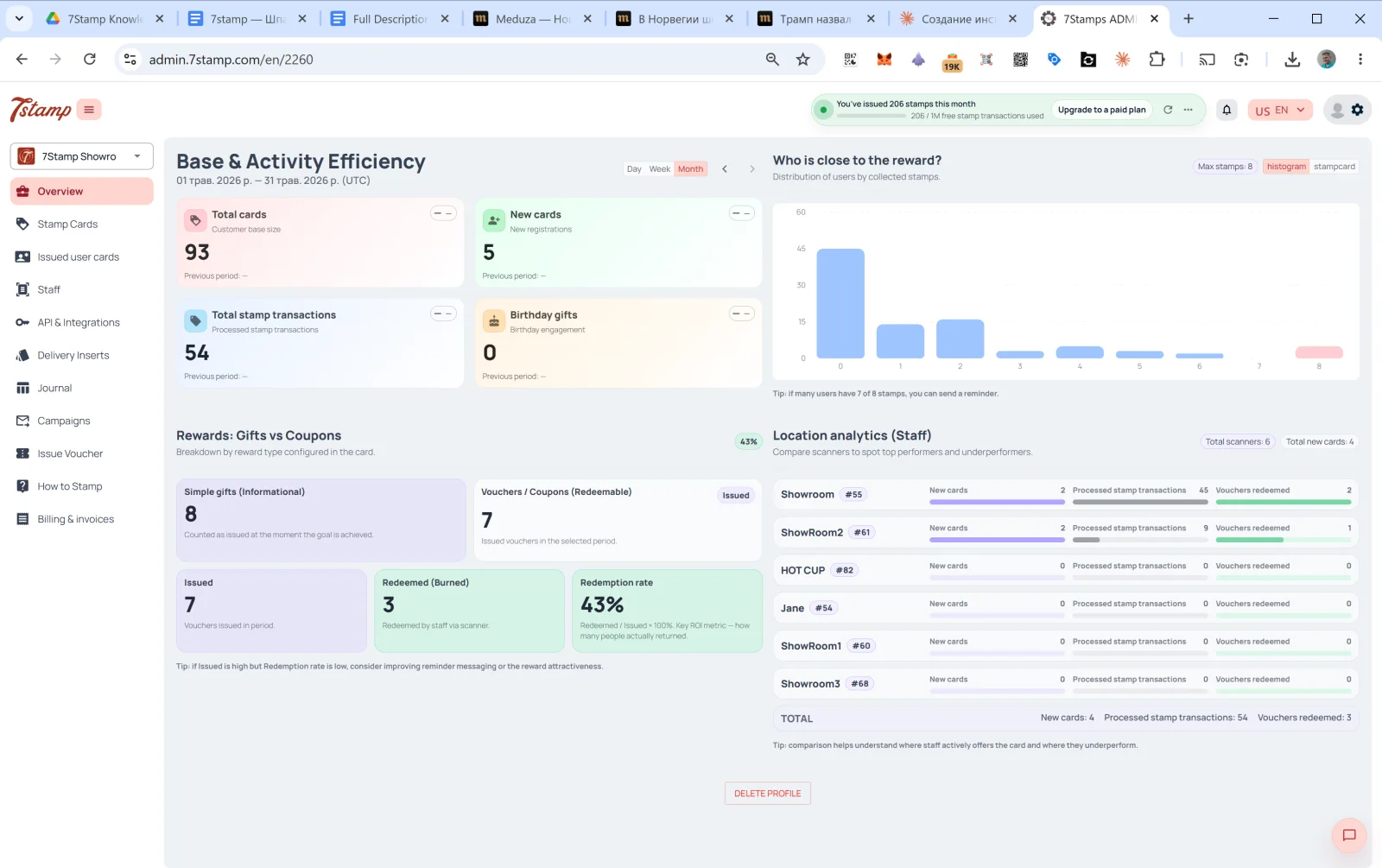
Overview is the main page of the admin, the 첫 번째 thing you see after login. A four-섹션 대시보드.
16.1 베이스 & Activity Efficiency
베이스 activity for the chosen period. Switch in the upper right: Day / Week / Month (default Month), arrows ← → to navigate periods.
Four 카드:
- Total 카드 — total 고객 베이스 (고객 베이스 size).
- New 카드 — new registrations in the period (New registrations).
- Total 스탬프 transactions — processed 스탬프 transactions.
- Birthday gifts — Birthday engagement (issued birthday gifts).
Each 카드 has a previous-period comparison (이전 period: — if there’s no data).
16.2 Who is close to the 보상?
A histogram of 고객 distribution by collected 스탬프. The X axis is the 스탬프 count (0, 1, 2, …, Max), the Y axis is the number of 고객 at that level.
The hint below: “if many users have 7 of 8 스탬프, you can send a 알림.” — this is the tool for finding hot segments: 고객 who need 1–2 more 스탬프 are most likely to 복귀 if reminded.
16.3 보상: Gifts vs Coupons
A split by issued 보상 type (Breakdown by 보상 type configured in the 카드):
- 간단한 gifts (Informational) — count of issued Awards (instant gifts that don’t require redemption).
- 바우처 / Coupons (Redeemable) — count of issued 바우처. Of which:
- Issued — issued.
- Redeemed (Burned) — redeemed by 직원 via the scanner.
- Redemption rate —
Redeemed / Issued × 100%. The main ROI metric — it shows how many 고객 actually returned and used the gift.
The hint below: “if Issued is high but Redemption rate is low, consider improving 알림 messaging or the 보상 attractiveness.” — if you issue many but redeem few, the problem is either in the reminders or in the attractiveness of the gift.
16.4 Location analytics (직원)
직원 / location performance comparison. At the top — Total scanners and Total new 카드 counters.
For each 직원:
- Name +
#ID. - New 카드 — how many new 고객 this 직원 brought in the period.
- Processed 스탬프 transactions — how many 스탬프 were added.
- 바우처 redeemed — how many 바우처 were redeemed.
At the bottom — TOTAL across all 직원.
Hint: “comparison helps 이해 where 직원 actively offers the 카드 and where they underperform.”
This block is a critical management tool. If Showroom1 has 45 스탬프 in a month and HOT CUP has 0, that’s a signal: either the 직원 isn’t offering the 카드 to 고객, or they have a technical scanner problem. Worth folding into shift KPIs.
시각적 안내
아래 화면 세트를 문서의 시각적 보조 자료로 사용하세요. 이미지를 클릭하면 전체 크기로 볼 수 있습니다.