
15. Journal — event log (การ์ด Events)
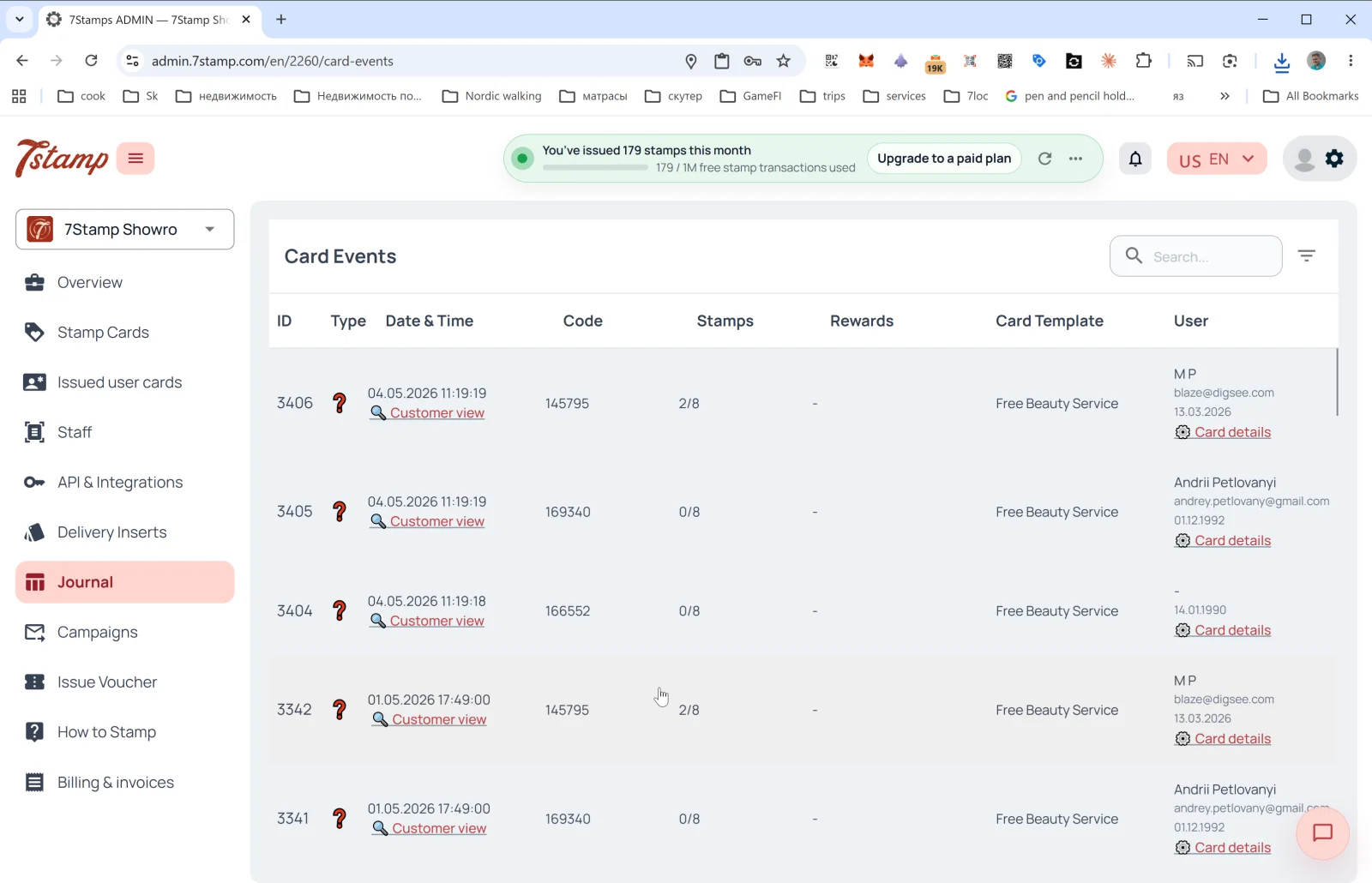
The Journal ส่วน in the side menu is the full log of all การ์ด events. The page header inside is การ์ด Events.
Table columns
- ID — event sequence number.
- Type — event type (icons). Includes การ์ด issuance, แสตมป์ added, goal reached, voucher issued / redeemed, lottery, birthday, แคมเปญ sent.
- Date & Time — date and time + the 🔍 ลูกค้า view link to เปิด the การ์ด through the ลูกค้า’s eyes (see below).
- Code — event code (e.g., the issued เดลิเวอรี Insert or Receipt ID).
- แสตมป์ — แสตมป์ progress at the time of the event (
2/8,0/8). - รางวัล — which gift dropped (if applicable).
- การ์ด Template — the template name (
Free ธุรกิจความงาม Service,Free Coffee). - User — ลูกค้า name, email, birthday + การ์ด details link (เปิด การ์ด details in
Issued user การ์ด).
Above the table — the ค้นหา field and filter.
ลูกค้า view — preview through the ลูกค้า’s eyes
The ลูกค้า view link on a journal row opens the ลูกค้า page on the my.7stamp.com/{lang}/{cardId}/การ์ด?user_uuid=...&สแกน_id=... domain. You see:
- The real brand at the top (logo, ธุรกิจ name).
- A
แสตมป์ added: Npopup. - If a goal is reached — Congratulations! You’ve unlocked your voucher! with confetti.
- The voucher การ์ด: QR code, name, Redeem Code, description, status (
Redeemed at: <date>— if already used), barcode. - Footer:
Powered by 7Stamp | Every แสตมป์ is a Story.
This is an irreplaceable debugging tool: if the ลูกค้า complains “the แสตมป์ didn’t go through”, you เปิด ลูกค้า view and see exactly what they did.
การ์ด details
The การ์ด details link on a Journal row goes to Issued user การ์ด with the details panel already เปิด for that specific การ์ด — from there you can see the full history, send a message, or issue a personal voucher.
คำแนะนำแบบภาพ
ใช้ชุดหน้าจอด้านล่างเป็นตัวช่วยทางภาพสำหรับบทความ คลิกรูปภาพใดก็ได้เพื่อดูในขนาดเต็ม